Permission sets and gates
This page is for the administrator who gives people and integrations access to Bifröst. It explains the Bifröst permission sets, and how the gates among them work on top of each user's own Business Central permissions. Which tables and fields an agent may read and change is in Control what agents read and change. The short version is in Give people and apps permission.
Permission sets are assigned in Business Central, on Users and Microsoft Entra Applications, by a user who may assign permissions.
Two layers of permission
An agent works as the Business Central user it acts for, and an integration as its Microsoft Entra application. Every request runs with that identity's permissions, so an agent can never do more than its user can do in the client. Two layers decide what it may do:
- Business Central permissions, as in the client: the user's ordinary permission sets decide which data they may read, change and post. Bifröst does not widen them, with two exceptions, below.
- Bifröst permission sets:
BIFROST API orilets the identity call Bifröst at all, and a gate opens each action that Bifröst keeps closed even for a user who could do it in the client, such as posting.
Both layers must allow an action. A user who may post sales invoices in the client cannot post them through Bifröst without the posting gate, and the gate alone posts nothing for a user who may not post in the client.
Does a Bifröst permission set give a user more rights?
No, with two exceptions, both from BIFROST API ori: reading the change log, and reading some setup and the
right to calculate sales prices and discounts. A user with narrow permissions in Business Central otherwise stays
narrow, however many Bifröst permission sets you add:
- The Bifröst permission sets cover Bifröst's own pages and data: the messages, the setup, the memory and the logs. They do not open customers, items, documents or ledger entries themselves, but see the change log below.
- The gates narrow; they never widen. A posting gate is an extra check on top of the user's own posting permission. Without that permission in Business Central, the gate posts nothing.
- Bifröst's code follows Business Central's rules. Where it writes to journal lines or document headers, it goes through the user's own (indirect) permissions, the same way Business Central's own posting does.
BIFROST Force orilets a change past Bifröst's own restrictions: Field Access, and the ChangeLog Write Guard when it is set to Via force. It never goes past Business Central's permissions.- Exception 1:
BIFROST API oriincludes Business Central's View Change Log Entries permission set (Changelog - Read). It lets the user read the change log entries, which show the old and new values of every logged field, on any table the change log covers, such as customers, vendors, items and bank accounts. This applies in the Business Central client too, even if the user's own permissions do not include those tables. Through Bifröst, only the change-log operations (field history, restoring an earlier value) read them, and only for tables the user may read; a general read never returns them. See What agents read and change. - Exception 2:
BIFROST API orican read some setup that price and availability answers need: currencies and exchange rates, VAT posting setup, general ledger setup, sales and receivables setup, price calculation setup, the customer price and discount groups, item discount groups, item units of measure and the list of fields, and it has the right to calculate sales prices and discounts. A user withBIFROST API orihas these even if their own permissions do not include them. It can change none of them.
The Bifröst permission sets
On Permission Sets, search for BIFROST to see them all.
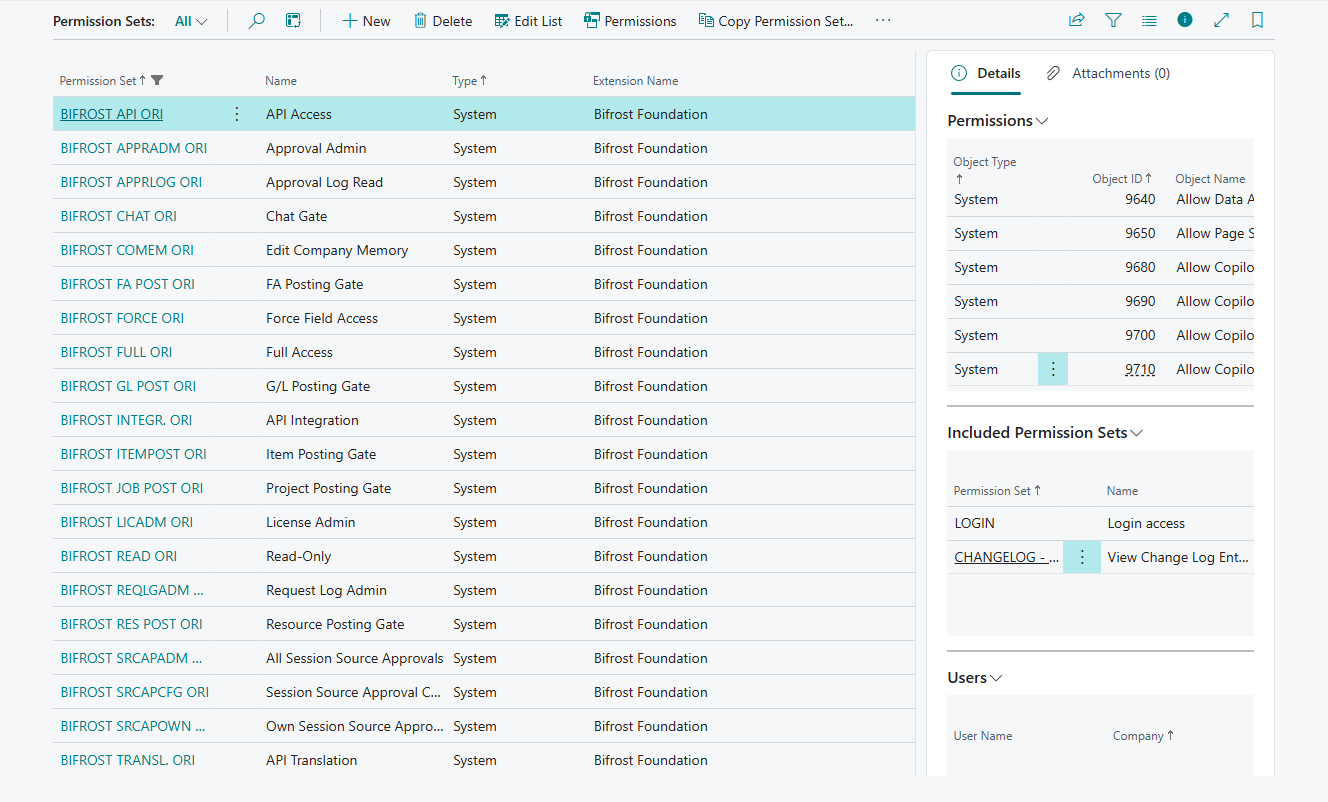
Base sets: one of these for every identity that uses Bifröst.
| Set | For | What it gives |
|---|---|---|
BIFROST API ori | Every person or integration that calls Bifröst | Calling Bifröst, the user's own messages, memory and notes, and the setup Bifröst reads to answer (currencies, prices, VAT posting setup). It also includes reading the change log entries (see above). No other business data |
BIFROST Read ori | Support staff | Looking at Bifröst's pages and logs, and the user's own messages. It changes no settings |
BIFROST Full ori | Bifröst administrators | All of Bifröst's own data and pages, including every user's messages. Not the posting, approval, licensing, force, chat or session-source gates: an administrator assigns those explicitly, also to themselves. It does include the inbound-webhook gate |
Gates: each opens one kind of action. They hold no data.
| Set | Opens |
|---|---|
BIFROST GL Post ori | Posting that ends in the general ledger: general journals, sales and purchase documents, correcting and cancelling posted invoices, bank reconciliations, adjusting exchange rates, applying and unapplying customer and vendor entries, and reversing registers and transactions |
BIFROST ItemPost ori | Posting item journals |
BIFROST FA Post ori | Posting fixed asset journals |
BIFROST Job Post ori | Posting project journals and invoicing from project ledger entries |
BIFROST Res Post ori | Posting resource journals |
BIFROST ApprAdm ori | Sending documents for approval and cancelling approval requests |
BIFROST LicAdm ori | The licensing actions on Bifrost Setup, and usage |
BIFROST Force ori | Forcing a change past the ChangeLog Write Guard when it is set to Via force, and, in every guard setting, changing the company configuration fields while a company is set up. Only for the people who set up companies |
BIFROST Webhook ori | Receiving inbound webhooks: for the identity that forwards them into Business Central |
BIFROST Chat ori | Opening Bifröst chat, which Bifröst Language Models provides |
BIFROST SrcApOwn ori | Approving a tool (session source) for oneself |
BIFROST SrcApAdm ori | Approving tools for any user |
BIFROST SrcApCfg ori | Shows a user's Approval Type to users without BIFROST Full ori. A holder of BIFROST Full ori can change it without this set |
BIFROST ReqLgAdm ori | Turning Request Debug Mode on and off |
Data sets: extra access to one area of Bifröst data.
| Set | Gives |
|---|---|
BIFROST CoMem ori | Changing the company memory and the translations |
BIFROST Transl. ori | Changing the translations |
BIFROST Integr. ori | Managing outbound integration endpoints |
BIFROST ApprLog ori | Reading the approval log |
How a gate works
Each gate is a permission set that gives one thing: permission to change a table that holds no records. Before Bifröst carries out a gated action, it asks Business Central whether the user may change that table. If not, nothing is read, changed or posted, and the answer names the permission set that is missing.
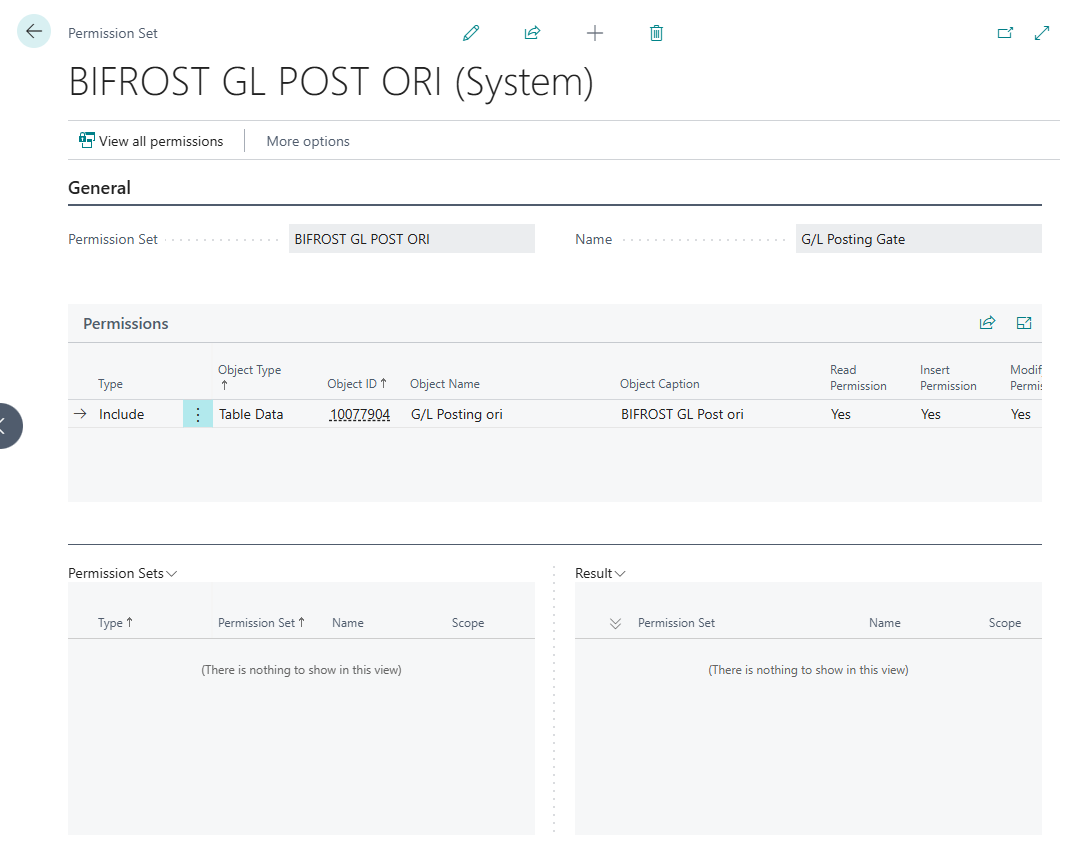
What follows from this:
- Read permission on a gate opens nothing.
BIFROST Read orican read some gates to show settings; that is not enough to pass them. - SUPER passes every gate. Keep SUPER away from users and integrations that work through Bifröst.
- A gate adds no data permission. Posting a sales invoice through Bifröst needs the user's Business Central
permission to post sales documents and
BIFROST GL Post ori. Previewing a posting needs the gate too. - Gates work through security groups like any permission set: assign the gate to the group. Except
BIFROST ReqLgAdm ori: assign it to the user directly. BIFROST Full oriopens no posting gate (only the inbound-webhook gate). An administrator who posts through Bifröst needs the posting gates too.
Which gate opens what
When an agent tries something its user's gates do not open, Bifröst refuses with a message such as Posting denied: missing 'BIFROST GL Post ori' permission set, and tells the user to ask an administrator to assign it.
| The user wants the agent to | Business Central permission to | And the gate |
|---|---|---|
| Read customers, items, documents, ledger entries | read them | - (BIFROST API ori) |
| Create or change a sales order | create and change sales documents | - |
| Post a sales or purchase document, a general journal, a bank reconciliation | post them | BIFROST GL Post ori |
| Post an item journal | post item journals | BIFROST ItemPost ori |
| Send a purchase order for approval | use approvals | BIFROST ApprAdm ori |
| Read usage or licensing | - | BIFROST LicAdm ori |
Typical combinations
| Who | Bifröst permission sets |
|---|---|
| A person who asks and prepares documents | BIFROST API ori |
| An accountant who also posts through Bifröst | BIFROST API ori, BIFROST GL Post ori |
| A warehouse clerk who posts item journals | BIFROST API ori, BIFROST ItemPost ori |
| A buyer who sends orders for approval | BIFROST API ori, BIFROST ApprAdm ori |
| An integration (Entra application) | BIFROST API ori, and only the gates of what it does. Never SUPER |
| The identity that forwards webhooks | BIFROST API ori, BIFROST Webhook ori |
| Support staff | BIFROST Read ori |
| A Bifröst administrator | BIFROST Full ori, BIFROST LicAdm ori; BIFROST ReqLgAdm ori only while debugging |
Add each user's ordinary Business Central permission sets for the data they work with, as for the client.
Assign and check
Assign. Open Users, open the user, and add the sets under User Permission Sets. For an integration, open Microsoft Entra Applications and the application, and add them there. Changes apply to requests made afterwards.
Check a gate. On the user card, choose Effective Permissions and find the gate: it has the name of its set (for example BIFROST GL Post ori). When Modify Permission is Yes, the gate is open for the user.
Troubleshooting
What an agent says when a permission set or a gate is missing, and what to do, is in the one troubleshooting table for administrators, with the other refusals users report.